Shifting from a Professional Employer Organization (PEO) to managing payroll and HR in-house is a pivotal moment for growing companies.
However, the transition can feel complex.
You’re unwinding a co-employment relationship, standing up tax accounts, migrating historical data, coordinating benefits, and managing year-end responsibilities while still running day-to-day operations.
This PEO transition checklist is designed for HR and finance leaders who need a clear, low-risk path to exit a PEO and stand up a modern Human Capital Management (HCM) platform.
Why Do Organizations Move on From PEOs?
Companies can decide to leave or transition on from a PEO for any number of reasons. Here are some of the most common we’ve seen.
Greater customization and control: One-size-fits-all PEO models can limit how you handle pay policies, scheduling, benefits, and reporting. In-house HCM lets you align workflows with your unique business and culture.
Economics at scale: As headcount grows, bundled PEO fees can outpace the cost of running payroll/HR on a modern HCM, especially when you already have internal expertise.
Eliminate redundancy: Mature HR teams often duplicate services they also pay the PEO to provide. Bringing tools in-house streamlines operations and spend.
Better data visibility and ownership: Real-time analytics, audit trails, and granular access controls are easier to achieve with your own HCM.
Employee experience: Branded, mobile self-service and clearer communications improve adoption, engagement, and trust.
What Should You Do Before You Leave Your PEO?
Build the business case
- Compare current PEO costs vs. total cost of ownership for HCM (software, taxes/filings, internal staffing, integrations).
- Map savings from unbundling services and eliminating overlap.
Capture requirements
- Payroll: pay frequencies, earnings/deductions, garnishments, shift differentials, multi-state, union rules, GL mapping.
- HR: onboarding, document management, policy acknowledgments, audits.
- Time: complex scheduling, tip allocation, job costing, device/mobile needs.
- Benefits/ACA: eligibility, waiting periods, measurement/stability periods, 1095-C.
- Integrations: POS/eCommerce, ERP/GL, ATS, benefits carriers, banking.
- Security/compliance: roles, approvals, audit logs, wage and hour, multi-state.
Select your HCM platform and partner
- Industry Expertise: Your vendor must understand your world. Seasonality, union rules, multi-state complexities, these aren’t optional knowledge areas.
- Proven Transition Experience: You want a vendor who’s walked this path before. Smooth migrations cut risk and downtime.
- Unified Platform: Payroll, HR, time, benefits, compliance—all in one system that talks to itself. No patchwork, no gaps.
- Configurable Workflows: One-size-fits-all won’t cut it. Your HCM must be flexible to your pay policies, scheduling, and reporting needs.
- Data Integrity & Migration Support: Your history matters. Your vendor should handle complex data transfers cleanly, YTD balances, deductions, and garnishments.
- Robust Compliance Tools: Multistate tax, ACA, wage-hour laws, union rules, automatic updates and strong audit trails keep you ahead of regulators.
- Integration Capabilities: Review necessary integrations and confirm your HCM provider can accommodate these needs or suggest alternative solutions.
- User Experience: Your team and your workforce need intuitive self-service that reduces calls and errors. Mobile access is a must.
- Strong Controls & Security: Dual approvals, audit logs, exception reporting—tools to prevent fraud and enforce segregation of duties.
- Support & Partnership: Get honest, hands-on help. Dedicated resources who understand your industry and respond when stakes are high.
- Scalability: The solution grows with you. Whether you’re handling 50 employees or 5,000, the system must evolve without major overhauls.
Review your PEO agreement and timelines
- Termination windows and notice periods.
- Benefits runout, COBRA administration, and carrier transitions.
- Year-end handling (W-2 responsibility if you switch mid-year).
Stand up employer accounts and policies
- Confirm federal, state, and local tax registrations (SUTA, withholding).
- Validate SUI rates and unemployment accounts.
- Align internal approval matrices and segregation of duties (fraud prevention).
Organize data and documents
- Employee master data, tax forms, payment preferences.
- Pay history and year-to-date balances.
- Accrual balances (PTO, sick), active garnishments, and benefits elections.
- Company-level setup: GL map, locations, departments, job codes.
What Should You Do While You’re Transitioning from PEO to HCM?
Set a realistic timeline
- Typical projects run 60–120 days depending on complexity, integrations, and headcount. Establish milestones for data extraction, configuration, parallel runs, and go-live.
Configure your HCM
- Company structures, earnings/deductions, benefits plans, pay calendars.
- Time and scheduling rules, premiums, holidays, and accruals.
- Manager and employee self-service with role-based permissions.
Migrate and validate data
- Cleanse and import employee records, tax details, and YTD values.
- Validate edge cases (retro pay, off-cycles, commissions, multiple jobs).
Run parallel payrolls
- Perform two to three parallel cycles comparing gross-to-net, taxes, benefits, GL, and bank files; reconcile discrepancies before go-live.
Integrate systems
- Connect POS/eCommerce, ATS, ERP/GL, benefits carriers, and banking.
- Verify file timing, formats, and error handling.
Communicate change
- Give employees clear timelines, FAQs, and self-service instructions.
- Train managers on approvals, scheduling, and reporting.
Strengthen controls
- Enforce dual approvals for pay changes and bank accounts.
- Use audit logs, alerts, and exception reporting to deter fraud.
What Should You Do After Leaving Your PEO?
Reconcile thoroughly
- Validate taxes, benefits deductions, GL entries, and funding files each cycle.
- Confirm carrier enrollments and evidence-of-coverage files are accepted.
Close out with your PEO
- Retrieve final reports and confirmations.
- Ensure year-end responsibilities are documented (you may issue two W-2s if you switched mid-year).
Monitor and optimize
- Track KPIs: payroll accuracy, off-cycle rate, timecard completion, ticket resolution.
- Gather feedback and fine-tune workflows and permissions.
Prepare for year-end/compliance
- Confirm ACA measurement and coding, multistate tax configurations, and any leave requirements.
How to choose your PEO exit and HCM implementation partner
- Proven transition experience: Look for a team that has led PEO exits and HCM deployments end-to-end.
- Industry fluency: Complex payroll rules, unique scheduling challenges, union versus non-union dynamics, fluctuating seasonality, and specific compliance demands shape how you work. An HCM partner should have experience in your industry to ensure a smooth transition.
- Implementation methodology: Structured plan, parallel testing, and clear owners for data, config, and change management.
- Compliance and risk: Guidance on multistate tax, ACA, wage-and-hour, and strong fraud controls.
- Support model and value: Dedicated resources, responsive support, and a clear path to ROI—not just software.
Suggested Project Timeline (An Expert Example)
Weeks 1–2: Contract, discovery, data extract, PEO notice.
Weeks 3–6: Configuration, integrations, first data load.
Weeks 7–9: Parallel payrolls, reconciliations, user training.
Weeks 10–12: Go-live, post-payroll audits, optimization.
Switch with Confidence
Transitioning off a PEO is a strategic step, one that rewards careful planning and the right partner. VensureHR’s HCM offerings and implementation team help you exit cleanly.
For existing VensureHR PEO clients, the transition is even easier! No matter your business’s needs, you can find solutions through a single provider. This allows you to retain the relationships you love with flexible tools and services that scale to meet your needs.
VensureHR HCM delivers a unified, configurable platform for payroll, HR, time and scheduling, benefits, talent, and compliance supported by an experienced team that ensures a seamless, low-risk implementation.
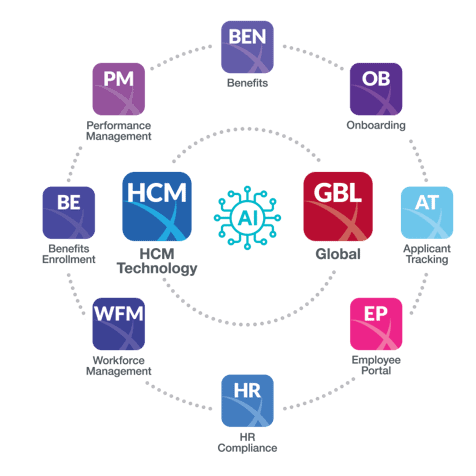
We bring industry-ready templates and best practices to accelerate setup and reduce risk, plus hands-on migration and tax support to load YTD data, establish tax accounts, and align GL and carrier feeds.
Want a tailored transition plan or a walkthrough of VensureHR HCM? Contact us to schedule a consultation or demo.